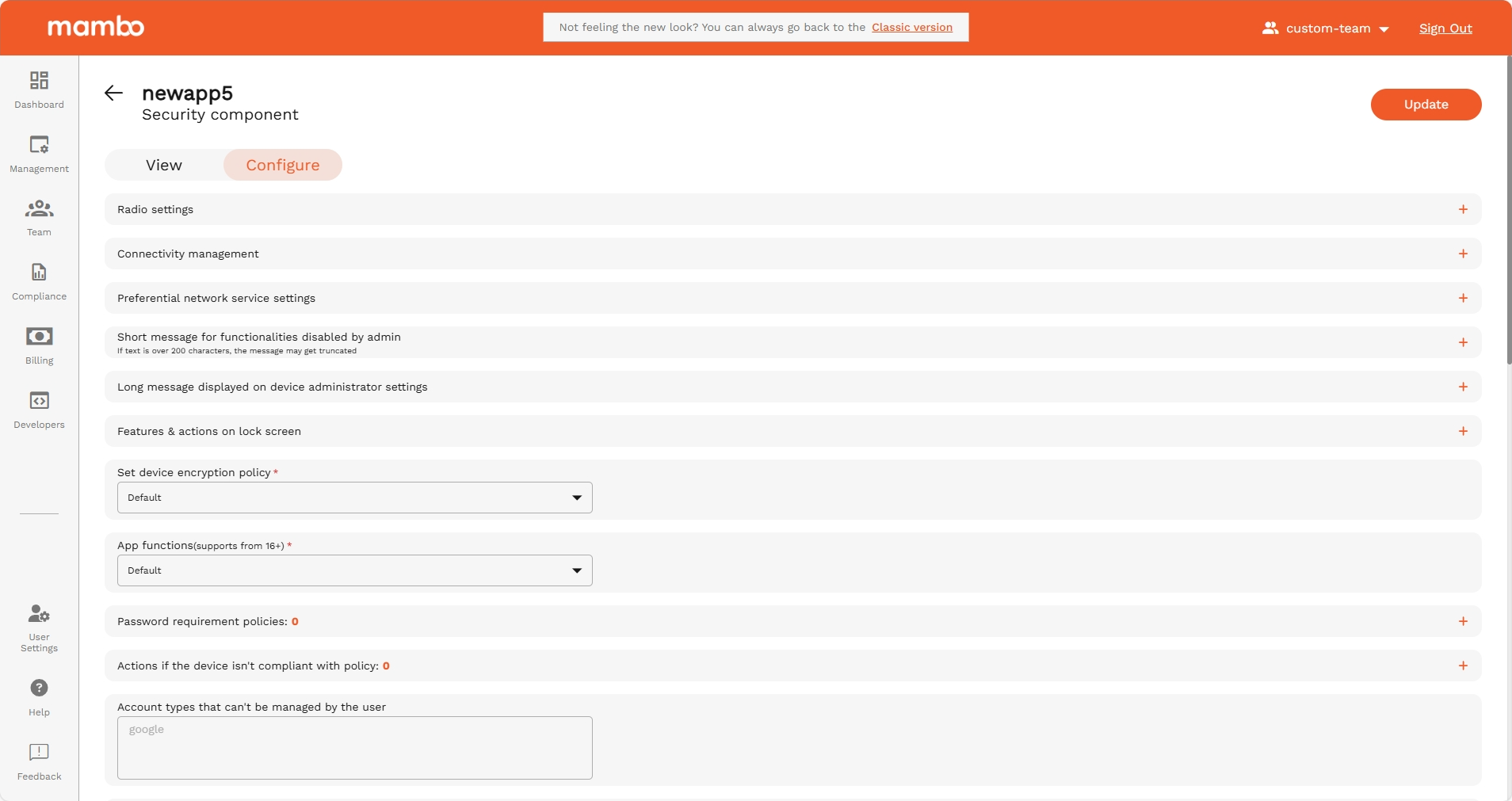
Security Component
The Security Policy Component is used to control how secure a device must be.
It lets you manage screen lock requirements, encryption, system restrictions, and what actions users are allowed to take on the device.
Use this component when you need to protect data and prevent misuse of a managed device.
Device Radio State
Device Radio State
API reference: deviceRadioState
Type: object
Covers controls for radio state such as Wi-Fi, bluetooth, and more.
Controls for device radio settings.
Control Wi-Fi states
API reference: wifiState
Type: enum
Controls current state of Wi-Fi and if user can change its state.
Controls whether the Wi-Fi is on or off as a state and if the user can change said state. Supported on company-owned devices running Android 13 and above.
Options
| Option | Enum | Description |
|---|---|---|
| Default | WIFI_STATE_UNSPECIFIED | Unspecified. Defaults to WIFI_STATE_USER_CHOICE |
| User is allowed to enable/disable Wi-Fi | WIFI_STATE_USER_CHOICE | User is allowed to enable/disable Wi-Fi. |
| Wi-Fi enforced and not allowed to be turned off | WIFI_ENABLED | Wi-Fi is on and the user is not allowed to turn it off. A NonComplianceDetail with API_LEVEL is reported if the Android version is less than 13. |
| Wi-Fi is off and not allowed to be turned on | WIFI_DISABLED | Wi-Fi is off and the user is not allowed to turn it on. A NonComplianceDetail with API_LEVEL is reported if the Android version is less than 13. |
Control airplane mode state
API reference: airplaneModeState
Type: enum
Controls whether airplane mode can be toggled by the user or not.
Controls the state of airplane mode and whether the user can toggle it on or off. Supported on Android 9 and above. Supported on fully managed devices and work profiles on company-owned devices.
Options
| Option | Enum | Description |
|---|---|---|
| Default | AIRPLANE_MODE_STATE_UNSPECIFIED | Unspecified. Defaults to AIRPLANE_MODE_USER_CHOICE. |
| User is allowed to toggle airplane mode | AIRPLANE_MODE_USER_CHOICE | The user is allowed to toggle airplane mode on or off. |
| Airplane mode is disabled | AIRPLANE_MODE_DISABLED | Airplane mode is disabled. The user is not allowed to toggle airplane mode on. A NonComplianceDetail with API_LEVEL is reported if the Android version is less than 9. |
Control ultra wideband state
API reference: ultraWidebandState
Type: enum
Controls the state of the ultra wideband setting and whether the user can toggle it on or off.
Controls the state of the ultra wideband setting and whether the user can toggle it on or off. Supported on Android 14 and above. Supported on fully managed devices and work profiles on company-owned devices.
Options
| Option | Enum | Description |
|---|---|---|
| Default | ULTRA_WIDEBAND_STATE_UNSPECIFIED | Unspecified. Defaults to ULTRA_WIDEBAND_USER_CHOICE. |
| User is allowed to toggle ultra wideband | ULTRA_WIDEBAND_USER_CHOICE | The user is allowed to toggle ultra wideband on or off. |
| Ultra wideband is disabled | ULTRA_WIDEBAND_DISABLED | Ultra wideband is disabled. The user is not allowed to toggle ultra wideband on via settings. A NonComplianceDetail with API_LEVEL is reported if the Android version is less than 14. |
Control cellular 2G setting usability
API reference: cellularTwoGState
Type: enum
Controls whether cellular 2G setting can be toggled by the user or not.
Controls the state of cellular 2G setting and whether the user can toggle it on or off. Supported on Android 14 and above. Supported on fully managed devices and work profiles on company-owned devices.
Options
| Option | Enum | Description |
|---|---|---|
| Default | CELLULAR_TWO_G_STATE_UNSPECIFIED | Unspecified. Defaults to CELLULAR_TWO_G_USER_CHOICE. |
| User is allowed to toggle cellular 2G | CELLULAR_TWO_G_USER_CHOICE | The user is allowed to toggle cellular 2G on or off. |
| Cellulular 2G is disabled | CELLULAR_TWO_G_DISABLED | Cellular 2G is disabled. The user is not allowed to toggle cellular 2G on via settings. A NonComplianceDetail with API_LEVEL is reported if the Android version is less than 14. |
Minimum required security level of Wi-Fi networks
API reference: minimumWifiSecurityLevel
Type: enum
The minimum required security level of Wi-Fi networks that the device can connect to.
Defines the different minimum Wi-Fi security levels required to connect to Wi-Fi networks. Supported on Android 13 and above. Supported on fully managed devices and work profiles on company-owned devices.
Options
| Option | Enum | Description |
|---|---|---|
| Default | MINIMUM_WIFI_SECURITY_LEVEL_UNSPECIFIED | Defaults to OPEN_NETWORK_SECURITY, which means the device will be able to connect to all types of Wi-Fi networks. |
| Fully open: can connect to all types of Wi-Fi | OPEN_NETWORK_SECURITY | The device will be able to connect to all types of Wi-Fi networks. |
| Only personal networks allowed (WEP, WPA2-PSK) | PERSONAL_NETWORK_SECURITY | A personal network such as WEP, WPA2-PSK is the minimum required security. The device will not be able to connect to open wifi networks. This is stricter than OPEN_NETWORK_SECURITY. A NonComplianceDetail with API_LEVEL is reported if the Android version is less than 13. |
| Only enterprise EAP networks allowed | ENTERPRISE_NETWORK_SECURITY | An enterprise EAP network is the minimum required security level. The device will not be able to connect to Wi-Fi network below this security level. This is stricter than PERSONAL_NETWORK_SECURITY. A NonComplianceDetail with API_LEVEL is reported if the Android version is less than 13. |
| Only 192-bit enterprise EAP networks allowed | ENTERPRISE_BIT192_NETWORK_SECURITY | A 192-bit enterprise network is the minimum required security level. The device will not be able to connect to Wi-Fi network below this security level. This is stricter than ENTERPRISE_NETWORK_SECURITY. A NonComplianceDetail with API_LEVEL is reported if the Android version is less than 13. |
Device Connectivity Management
Device Connectivity Management
API reference: deviceConnectivityManagement
Type: Object
Covers controls for device connectivity such as Wi-Fi, USB data access, keyboard/mouse connections, and more.
USB Data Access
API reference: usbDataAccess
Type: enum
Controls what files and/or data can be transferred via USB. Supported only on company-owned devices.
Controls what files and/or data can be transferred via USB. Does not impact charging functions. Supported only on company-owned devices.
Options
| Option | Enum | Description |
|---|---|---|
| Default | USB_DATA_ACCESS_UNSPECIFIED | Unspecified. Defaults to DISALLOW_USB_FILE_TRANSFER. |
| Allow | ALLOW_USB_DATA_TRANSFER | All types of USB data transfers are allowed. usbFileTransferDisabled is ignored. |
| Disallow file transfer | DISALLOW_USB_FILE_TRANSFER | Transferring files over USB is disallowed. Other types of USB data connections, such as mouse and keyboard connection, are allowed. usbFileTransferDisabled is ignored. |
| Disallow all | DISALLOW_USB_DATA_TRANSFER | When set, all types of USB data transfers are prohibited. Supported for devices running Android 12 or above with USB HAL 1.3 or above. If the setting is not supported, DISALLOW_USB_FILE_TRANSFER will be set. A NonComplianceDetail with API_LEVEL is reported if the Android version is less than 12. A NonComplianceDetail with DEVICE_INCOMPATIBLE is reported if the device does not have USB HAL 1.3 or above. usbFileTransferDisabled is ignored. |
Wi-Fi configuration
API reference: ConfigureWifi
Type: enum
Controls Wi-Fi configuring privileges. Based on the option set, user will have either full or limited or no control in configuring Wi-Fi networks.
Controls Wi-Fi configuring privileges. Based on the option set, the user will have either full or limited or no control in configuring Wi-Fi networks.
Options
| Option | Enum | Description |
|---|---|---|
| Default | CONFIGURE_WIFI_UNSPECIFIED | Unspecified. Defaults to ALLOW_CONFIGURING_WIFI unless wifiConfigDisabled is set to true. If wifiConfigDisabled is set to true, this is equivalent to DISALLOW_CONFIGURING_WIFI. |
| Allow | ALLOW_CONFIGURING_WIFI | The user is allowed to configure Wi-Fi. wifiConfigDisabled is ignored. |
| Disallow new configurations but allow switch between already configured networks | DISALLOW_ADD_WIFI_CONFIG | Adding new Wi-Fi configurations is disallowed. The user is only able to switch between already configured networks. Supported on Android 13 and above, on fully managed devices and work profiles on company-owned devices. If the setting is not supported, ALLOW_CONFIGURING_WIFI is set. A NonComplianceDetail with API_LEVEL is reported if the Android version is less than 13. wifiConfigDisabled is ignored. |
| Disallow | DISALLOW_CONFIGURING_WIFI | Disallows configuring Wi-Fi networks. The setting wifiConfigDisabled is ignored when this value is set. Supported on fully managed devices and work profile on company-owned devices, on all supported API levels. For fully managed devices, setting this removes all configured networks and retains only the networks configured using openNetworkConfiguration policy. For work profiles on company-owned devices, existing configured networks are not affected and the user is not allowed to add, remove, or modify Wi-Fi networks. Note: If a network connection can't be made at boot time and configuring Wi-Fi is disabled then network escape hatch will be shown in order to refresh the device policy (see networkEscapeHatchEnabled). |
Wi-Fi direct configuration
API reference: wifiDirectSettings
Type: enum
Controls configuring and using Wi-Fi direct settings. Supported on company-owned devices running Android 13 and above.
Controls Wi-Fi direct settings. Supported on company-owned devices running Android 13 and above.
Options
| Option | Enum | Description |
|---|---|---|
| Default | WIFI_DIRECT_SETTINGS_UNSPECIFIED | Unspecified. Defaults to ALLOW_WIFI_DIRECT |
| Allow | ALLOW_WIFI_DIRECT | The user is allowed to use Wi-Fi direct. |
| Disallow | DISALLOW_WIFI_DIRECT | The user is not allowed to use Wi-Fi direct. A NonComplianceDetail with API_LEVEL is reported if the Android version is less than 13. |
Tethering settings
API reference: tetheringSettings
Type: enum
Controls tethering settings. Based on the value set, the user is partially or fully disallowed from using different forms of tethering.
Controls the extent to which the user is allowed to use different forms of tethering like Wi-Fi tethering, bluetooth tethering, etc.
Options
| Option | Enum | Description |
|---|---|---|
| Default | TETHERING_SETTINGS_UNSPECIFIED | Unspecified. Defaults to ALLOW_ALL_TETHERING unless tetheringConfigDisabled is set to true. If tetheringConfigDisabled is set to true, this is equivalent to DISALLOW_ALL_TETHERING. |
| Allow all | ALLOW_ALL_TETHERING | Allows configuration and use of all forms of tethering. tetheringConfigDisabled is ignored. |
| Disallow Wi-Fi tethering | DISALLOW_WIFI_TETHERING | Disallows the user from using Wi-Fi tethering. Supported on company owned devices running Android 13 and above. If the setting is not supported, ALLOW_ALL_TETHERING will be set. A NonComplianceDetail with API_LEVEL is reported if the Android version is less than 13. tetheringConfigDisabled is ignored. |
| Disallow all | DISALLOW_ALL_TETHERING | Disallows all forms of tethering. Supported on fully managed devices and work profile on company-owned devices, on all supported android versions. The setting tetheringConfigDisabled is ignored. |
Wi-Fi SSID Restriction Policy
API reference: wifiSsidPolicy
Type: Object
Restrictions on which Wi-Fi SSIDs the device can connect to. Note that this does not affect which networks can be configured on the device. Supported on company-owned devices running Android 13 and above.
Wi-Fi SSID Restriction Policy fields
| Field | API Reference | Type | Description |
|---|---|---|---|
| Wi-Fi SSID policy type | wifiSsidPolicyType | enum(Wi-Fi SSID Policy Type) | Type of the Wi-Fi SSID policy to be applied. |
| SSIDs to be allowed | wifiSsids[] | object(SSIDs to be allowed) | List of Wi-Fi SSIDs that should be applied in the policy. |
Wi-Fi SSID Policy Type
API reference: wifiSsidPolicy.wifiSsidPolicyType
Type: enum
Type of the Wi-Fi SSID policy to be applied.
The types of Wi-Fi SSID policy that can be applied on the device.
Options
| Option | Enum | Description |
|---|---|---|
Default WIFI_SSID_POLICY_TYPE_UNSPECIFIED | WIFI_SSID_POLICY_TYPE_UNSPECIFIED | Defaults to WIFI_SSID_DENYLIST.wifiSsids must not be set. There are no restrictions on which SSID the device can connect to. |
Deny WIFI_SSID_DENYLIST | WIFI_SSID_DENYLIST | The device cannot connect to any Wi-Fi network whose SSID is in wifiSsids, but can connect to other networks. |
Allow WIFI_SSID_ALLOWLIST | WIFI_SSID_ALLOWLIST | The device can make Wi-Fi connections only to the SSIDs in wifiSsids.wifiSsids must not be empty. The device will not be able to connect to any other Wi-Fi network. |
SSIDs to be allowed
API reference: wifiSsidPolicy.wifiSsids[]
Type: string
List of Wi-Fi SSIDs that should be applied in the policy. This field must be non-empty when WifiSsidPolicyType is set to WIFI_SSID_ALLOWLIST. If this is set to a non-empty list, then a NonComplianceDetail with API_LEVEL is reported if the Android version is less than 13 and a NonComplianceDetail with MANAGEMENT_MODE is reported for non-company-owned devices.
Represents a Wi-Fi SSID.
Wi-Fi Roaming Settings
API reference: wifiRoamingPolicy.wifiRoamingSettings[]
Type: Object
Wi-Fi roaming policy
Each roaming configuration contains: wifiSsid , wifiRoamingMode
Wi-Fi SSID
API reference: wifiRoamingPolicy.wifiSsid
SSID to which roaming policy applies.
Wifi Roaming Mode
Options
API reference: wifiRoamingPolicy.wifiRoamingMode
Type: enum
Options
| Option | Enum | Description |
|---|---|---|
| Unspecified | WIFI_ROAMING_MODE_UNSPECIFIED | Unspecified. Defaults to WIFI_ROAMING_DEFAULT. |
| Disabled | WIFI_ROAMING_DISABLED | Wi-Fi roaming is disabled. Supported on Android 15 and above on fully managed devices and work profiles on company-owned devices. A NonComplianceDetail with MANAGEMENT_MODE is reported for other management modes. A NonComplianceDetail with API_LEVEL is reported if the Android version is less than 15. |
| Default | WIFI_ROAMING_DEFAULT | Default Wi-Fi roaming mode of the device. |
| Aggressive | WIFI_ROAMING_AGGRESSIVE | Aggressive roaming mode which allows quicker Wi-Fi roaming. Supported on Android 15 and above on fully managed devices and work profiles on company-owned devices. A NonComplianceDetail with MANAGEMENT_MODE is reported for other management modes. A NonComplianceDetail with API_LEVEL is reported if the Android version is less than 15. A NonComplianceDetail with DEVICE_INCOMPATIBLE is reported if the device does not support aggressive roaming mode. |
Bluetooth Sharing
API reference: bluetoothSharing
Type: enum
Controls whether Bluetooth sharing is allowed.
Controls whether Bluetooth sharing is allowed.
Options
| Option | Enum | Description |
|---|---|---|
| Default | BLUETOOTH_SHARING_UNSPECIFIED | Unspecified. Defaults to BLUETOOTH_SHARING_DISALLOWED on work profiles and BLUETOOTH_SHARING_ALLOWED on fully managed devices. |
| Allowed | BLUETOOTH_SHARING_ALLOWED | Bluetooth sharing is allowed. Supported on Android 8 and above. A NonComplianceDetail with API_LEVEL is reported on work profiles if the Android version is less than 8. |
| Disallowed | BLUETOOTH_SHARING_DISALLOWED | Bluetooth sharing is disallowed. Supported on Android 8 and above. A NonComplianceDetail with API_LEVEL is reported on fully managed devices if the Android version is less than 8. |
Preferential Network Service Settings
Preferential Network Service Settings
API reference: preferentialNetworkServiceSettings
Type: Object
Preferential network service configuration. Setting this field will override preferentialNetworkService. This can be set on both work profiles and fully managed devices on Android 13 and above. See 5G network slicing guide for more details.
Preferential network service settings.
Default Preferential Network
API reference: preferentialNetworkServiceSettings.defaultPreferentialNetworkId
Type: enum
Default preferential network ID for the applications that are not in applications or if ApplicationPolicy.preferentialNetworkId is set to PREFERENTIAL_NETWORK_ID_UNSPECIFIED. There must be a configuration for the specified network ID in preferentialNetworkServiceConfigs, unless this is set to NO_PREFERENTIAL_NETWORK. If set to PREFERENTIAL_NETWORK_ID_UNSPECIFIED or unset, this defaults to NO_PREFERENTIAL_NETWORK. Note: If the default preferential network is misconfigured, applications with no ApplicationPolicy.preferentialNetworkId set are not able to access the internet. This setting does not apply to the following critical apps:com.google.android.apps.work.clouddpc com.google.android.gms ApplicationPolicy.preferentialNetworkId can still be used to configure the preferential network for them
Options
Network Service Configs
API reference: preferentialNetworkServiceSettings.preferentialNetworkServiceConfigs[]
Type: object
List of preferential network service configurations.
Each configuration defines how a specific preferential network behaves.
Each entry requires Preferential Network ID, Fallback to Default Connection, and Non Matching Networks Behavior.
Preferential Network Service Configuration Fields
Preferential Network ID
API reference: preferentialNetworkServiceConfigs[].preferentialNetworkId
Type: enum
Required. Preferential network identifier. This must not be set to NO_PREFERENTIAL_NETWORK or PREFERENTIAL_NETWORK_ID_UNSPECIFIED, the policy will be rejected otherwise.
Options
| Option | Enum | Description |
|---|---|---|
| Network identifier 1 | PREFERENTIAL_NETWORK_ID_ONE | Preferential network identifier 1. |
| Network identifier 2 | PREFERENTIAL_NETWORK_ID_TWO | Preferential network identifier 2. |
| Network identifier 3 | PREFERENTIAL_NETWORK_ID_THREE | Preferential network identifier 3. |
| Network identifier 4 | PREFERENTIAL_NETWORK_ID_FOUR | Preferential network identifier 4. |
| Network identifier 5 | PREFERENTIAL_NETWORK_ID_FIVE | Preferential network identifier 5. |
Fallback to Default Connection
API reference: preferentialNetworkServiceConfigs[].fallbackToDefaultConnection
Type: enum
Whether fallback to the device-wide default network is allowed. Note that while this setting determines whether the apps subject to this configuration have a default network in the absence of a preferential service, apps can still explicitly decide to use another network than their default network by requesting them from the system. This setting does not determine whether the apps are blocked from using such other networks. See nonMatchingNetworks for this setting.
Whether fallback to the device-wide default network is allowed. If this is set to FALLBACK_TO_DEFAULT_CONNECTION_ALLOWED, then nonMatchingNetworks must not be set to NON_MATCHING_NETWORKS_DISALLOWED, the policy will be rejected otherwise. Note: If this is set to FALLBACK_TO_DEFAULT_CONNECTION_DISALLOWED, applications are not able to access the internet if the 5G slice is not available.
Options
| Option | Enum | Description |
|---|---|---|
| Default | FALLBACK_TO_DEFAULT_CONNECTION_UNSPECIFIED | Unspecified. Defaults to FALLBACK_TO_DEFAULT_CONNECTION_ALLOWED. |
| Allow | FALLBACK_TO_DEFAULT_CONNECTION_ALLOWED | Fallback to default connection is allowed. If this is set, nonMatchingNetworks must not be set to NON_MATCHING_NETWORKS_DISALLOWED, the policy will be rejected otherwise. |
| Disallow | FALLBACK_TO_DEFAULT_CONNECTION_DISALLOWED | Fallback to default connection is not allowed. |
Non matching networks
API reference: preferentialNetworkServiceConfigs[].nonMatchingNetworks
Type: enum
Whether apps this configuration applies to are blocked from using networks other than the preferential service. If this is set to NON_MATCHING_NETWORKS_DISALLOWED, then fallbackToDefaultConnection must be set to FALLBACK_TO_DEFAULT_CONNECTION_DISALLOWED.
Whether apps this configuration applies to are allowed to use networks other than the preferential service. Apps can inspect the list of available networks on the device and choose to use multiple networks concurrently for performance, privacy or other reasons.
Options
| Option | Enum | Description |
|---|---|---|
| Default | NON_MATCHING_NETWORKS_UNSPECIFIED | Unspecified. Defaults to NON_MATCHING_NETWORKS_ALLOWED. |
| Allow | NON_MATCHING_NETWORKS_ALLOWED | Apps this configuration applies to are allowed to use networks other than the preferential service. |
| Disallow | NON_MATCHING_NETWORKS_DISALLOWED | Apps this configuration applies to are disallowed from using other networks than the preferential service. This can be set on Android 14 and above. A NonComplianceDetail with API_LEVEL is reported if the Android version is less than 14. If this is set, fallbackToDefaultConnection must be set to FALLBACK_TO_DEFAULT_CONNECTION_DISALLOWED, the policy will be rejected otherwise. |
Short message for functionalities disabled by admin
API reference: shortSupportMessage.UserFacingMessage
Type: Object
A message displayed to the user in the settings screen wherever functionality has been disabled by the admin. If the message is longer than 200 characters it may be truncated.
Provides a user-facing message with locale info. The maximum message length is 4096 characters.
Options
| Option | API Reference | Type | Description |
|---|---|---|---|
| Custom localization | localizedMessages | string | A map containing <locale, message> pairs, where locale is a well-formed BCP 47 language code, such as en-US, es-ES, or fr. An object containing a list of "key": value pairs. Example: { "en-US": "Company device", "fr": "Appareil de l’entreprise" }. |
| Default Message | defaultMessage | string | The default message displayed if no localized message is specified or the user's locale doesn't match with any of the localized messages. A default message must be provided if any localized messages are provided. |
Long message displayed on device administrator settings
API reference: longSupportMessage.UserFacingMessage
Type: Object
A message displayed to the user in the device administators settings screen.
Provides a user-facing message with locale info. The maximum message length is 4096 characters.
Options
| Option | API Reference | Type | Description |
|---|---|---|---|
| Custom localization | localizedMessages | string | A map containing <locale, message> pairs, where locale is a well-formed BCP 47 language code, such as en-US, es-ES, or fr. An object containing a list of "key": value pairs. Example: { "en-US": "Company device", "fr": "Appareil de l’entreprise" }. |
| Default Message | defaultMessage | string | The default message displayed if no localized message is specified or the user's locale doesn't match with any of the localized messages. A default message must be provided if any localized messages are provided. |
Features & actions on lock screen
API reference: keyguardDisabledFeatures[]
Type: enum
Disabled keyguard customizations, such as widgets.
Keyguard (lock screen) features that can be disabled.
Options
| Option | Enum | Description |
|---|---|---|
| Enable camera | CAMERA | Disable the camera on secure keyguard screens (e.g. PIN). |
| Show notifications | NOTIFICATIONS | Disable showing all notifications on secure keyguard screens. |
| Enable fingerprint unlock | DISABLE_FINGERPRINT | Disable fingerprint sensor on secure keyguard screens. |
| Enable face unlock | FACE | Disable face authentication on secure keyguard screens. |
| Enable iris unlock | IRIS | Disable iris authentication on secure keyguard screens. |
| Allow trust agents on lock screen | TRUST_AGENTS | Ignore trust agent state on secure keyguard screens. |
| Enable remote input (e.g. notification text input) | DISABLE_REMOTE_INPUT | Disable fingerprint sensor on secure keyguard screens. |
| Disable all shortcuts on Android 14 and above. | SHORTCUTS | Disable all shortcuts on secure keyguard screen on Android 14 and above. |
Encryption Policy
API reference: encryptionPolicy
Type: enum
Whether encryption is enabled
Type of encryption
Options
| Option | Enum | Description |
|---|---|---|
| Default | ENCRYPTION_POLICY_UNSPECIFIED | This value is ignored, i.e. no encryption required |
| Encryption doesn't require password on boot | ENABLED_WITHOUT_PASSWORD | Encryption required but no password required to boot |
| Encryption requires password on boot | ENABLED_WITH_PASSWORD | Encryption required with password required to boot |
App Functions
API reference: appFunctions
Type: enum
Controls whether apps on the device for fully managed devices or in the work profile for devices with work profiles are allowed to expose app functions.
Options
| Option | Enum | Description |
|---|---|---|
| Default | APP_FUNCTIONS_UNSPECIFIED | Unspecified. Defaults to APP_FUNCTIONS_ALLOWED. |
| Allowed | APP_FUNCTIONS_ALLOWED | Apps on the device for fully managed devices or in the work profile for devices with work profiles are not allowed to expose app functions. If this is set, crossProfileAppFunctions must not be set to CROSS_PROFILE_APP_FUNCTIONS_ALLOWED, otherwise the policy will be rejected. |
| Disallowed | APP_FUNCTIONS_DISALLOWED | Apps on the device for fully managed devices or in the work profile for devices with work profiles are allowed to expose app functions. |
Password Policies
Password Policies
API reference: passwordPolicies[]
Type: Object
Password requirement policies. Different policies can be set for work profile or fully managed devices by setting the passwordScope field in the policy.
Requirements for the password used to unlock a device.
Policy scope
API reference: passwordScope
Type: enum
The scope that the password requirement applies to.
Options
Unified work and personal lock
API reference: unifiedLockSettings
Type: enum
Applicable when: passwordScope = SCOPE_PROFILE
Controls whether a unified lock is allowed for the device and the work profile, on devices running Android 9 and above with a work profile. This can be set only if passwordScope is set to SCOPE_PROFILE, the policy will be rejected otherwise. If user has not set a separate work lock and this field is set to REQUIRE_SEPARATE_WORK_LOCK, a NonComplianceDetail is reported with nonComplianceReason set to USER_ACTION.
This has no effect on other devices.
Options
| Option | Enum | Description |
|---|---|---|
| Default | UNIFIED_LOCK_SETTINGS_UNSPECIFIED | Unspecified. Defaults to ALLOW_UNIFIED_WORK_AND_PERSONAL_LOCK |
| Require separate work and personal lock | ALLOW_UNIFIED_WORK_AND_PERSONAL_LOCK | A common lock for the device and the work profile is allowed. |
| Allow unified work and personal lock | REQUIRE_SEPARATE_WORK_LOCK | A separate lock for the work profile is required. |
Time before password re-entry is required
API reference: requirePasswordUnlock
Type: enum
The length of time after a device or work profile is unlocked using a strong form of authentication (password, PIN, pattern) that it can be unlocked using any other authentication method (e.g. fingerprint, trust agents, face). After the specified time period elapses, only strong forms of authentication can be used to unlock the device or work profile.
Options
| Option | Enum | Description |
|---|---|---|
| Default | REQUIRE_PASSWORD_UNLOCK_UNSPECIFIED | Unspecified. Defaults to USE_DEFAULT_DEVICE_TIMEOUT. |
| Use default | USE_DEFAULT_DEVICE_TIMEOUT | The timeout period is set to the device’s default. |
| 24 hours | REQUIRE_EVERY_DAY | The timeout period is set to 24 hours. |
Password Expiration Timeout
API reference: passwordExpirationTimeout
Type: string
Password expiration timeout.
A duration in seconds with up to nine fractional digits, ending with 's'. Example: "3.5s".
- Duration format example:
"86400s"(24 hours) - Value
0means no expiration
Password Quality
API reference: passwordQuality
Type: enum
Password quality requirements.
Note:
-
Complexity-based requirements are COMPLEXITY_LOW, COMPLEXITY_MEDIUM and COMPLEXITY_HIGH.
-
An instance of PasswordRequirements is said to be device-scoped if it has passwordScope set to SCOPE_DEVICE.
-
An instance of PasswordRequirements is said to be profile-scoped if it has passwordScope set to SCOPE_PROFILE.
-
An instance of PasswordRequirements is said to be complexity-based (respectively, non-complexity-based) if it has passwordQuality set to a complexity-based (respectively, non-complexity-based) value.
-
For each scope, if a complexity-based element is present, a non-complexity-based element must also be present for the same scope.
-
If a profile-scoped complexity-based element is present and device-scoped elements are present, then both device-scoped complexity-based and device-scoped non-complexity based elements must be present.
-
If there are profile-scoped elements with both complexity-based and non-complexity-based values (in this case the device-scoped elements must not be present or must have both complexity-based and non-complexity-based values as well), then the respective complexity-based values apply to devices with work profiles on Android 12 and above for both scopes, and the respective non-complexity-based values apply on all other devices.
-
If there are device-scoped elements with both complexity-based and non-complexity-based values but no profile-scoped elements are present, then complexity-based value applies to personally owned work profile devices on Android 12 and above, and only the non-complexity-based value applies on all other devices.
-
A non-complexity-based device-scoped requirement applied on personally owned work profile devices on Android 12 and above will be treated as the next strictest complexity-based requirement for application. This may lead to a slight discrepancy between the requested requirements and the applied requirements.
-
See appliedPasswordPolicies for which password requirements are actually taking effect on the device.
-
Refer to the PasswordQuality guide for more details on how PasswordRequirements instances are chosen to be applied based on the management mode.
Options
| Option | Enum | Description |
|---|---|---|
| No requirements | PASSWORD_QUALITY_UNSPECIFIED | There are no password requirements. |
| something | SOMETHING | A password is required, but there are no restrictions on what the password must contain. This, when applied on personally owned work profile devices on Android 12 device-scoped, will be treated as COMPLEXITY_LOW for application. See PasswordQuality for details. |
| Biometric | BIOMETRIC_WEAK | The device must be secured with a low-security biometric recognition technology, at minimum. This includes technologies that can recognize the identity of an individual that are roughly equivalent to a 3-digit PIN (false detection is less than 1 in 1,000). This, when applied on personally owned work profile devices on Android 12 device-scoped, will be treated as COMPLEXITY_LOW for application. See PasswordQuality for details. |
| Numeric | NUMERIC | The password must contain numeric characters. This, when applied on personally owned work profile devices on Android 12 device-scoped, will be treated as COMPLEXITY_MEDIUM for application. See PasswordQuality for details. |
| Numeric without repeats or sequences (No 22 or 123) | NUMERIC_COMPLEX | The password must contain numeric characters with no repeating (4444) or ordered (1234, 4321, 2468) sequences. This, when applied on personally owned work profile devices on Android 12 device-scoped, will be treated as COMPLEXITY_MEDIUM for application. See PasswordQuality for details. |
| Alphabetic | ALPHABETIC | The password must contain alphabetic (or symbol) characters. This, when applied on personally owned work profile devices on Android 12 device-scoped, will be treated as COMPLEXITY_HIGH for application. See PasswordQuality for details. |
| Alphanumeric | ALPHANUMERIC | The password must contain both numeric and alphabetic (or symbol) characters. This, when applied on personally owned work profile devices on Android 12 device-scoped, will be treated as COMPLEXITY_HIGH for application. See PasswordQuality for details. |
| Custom | COMPLEX | The password must meet the minimum requirements specified in passwordMinimumLength, passwordMinimumLetters, passwordMinimumSymbols, etc. For example, if passwordMinimumSymbols is 2, the password must contain at least two symbols. This, when applied on personally owned work profile devices on Android 12 device-scoped, will be treated as COMPLEXITY_HIGH for application. In this case, the requirements in passwordMinimumLength, passwordMinimumLetters, passwordMinimumSymbols, etc are not applied. See PasswordQuality for details. |
Minimum length
API reference: passwordMinimumLength
Type: Integer
The minimum allowed password length. A value of 0 means there is no restriction. Only enforced when passwordQuality is NUMERIC, NUMERIC_COMPLEX, ALPHABETIC, ALPHANUMERIC, or COMPLEX.
Minimum password length.
0= No restriction
Complex Password Character Rules
Applicable when: passwordQuality = COMPLEX
| Field | API reference | Type | Description |
|---|---|---|---|
| Minimum letters | passwordMinimumLetters | integer | Minimum number of letters required in the password. Only enforced when passwordQuality is COMPLEX. |
| Minimum lowercase letters | passwordMinimumLowerCase | integer | Minimum number of lower case letters required in the password. Only enforced when passwordQuality is COMPLEX. |
| Minimum uppercase letters | passwordMinimumUpperCase | integer | Minimum number of upper case letters required in the password. Only enforced when passwordQuality is COMPLEX. |
| Minimum non-letter | passwordMinimumNonLetter | integer | Minimum number of non-letter characters (numerical digits or symbols) required in the password. Only enforced when passwordQuality is COMPLEX. |
| Minimum numeric | passwordMinimumNumeric | integer | Minimum number of numerical digits required in the password. Only enforced when passwordQuality is COMPLEX. |
| Minimum special characters | passwordMinimumSymbols | integer | Minimum number of symbols required in the password. Only enforced when passwordQuality is COMPLEX. |
Password changes before reuse is allowed
API reference: passwordHistoryLength
Type: Integer
The length of the password history. After setting this field, the user won't be able to enter a new password that is the same as any password in the history. A value of 0 means there is no restriction.
0= No restriction
Password failures before device is wiped
API reference: maximumFailedPasswordsForWipe
Type: Integer
Number of incorrect device-unlock passwords that can be entered before a device is wiped. A value of 0 means there is no restriction.
0= No restriction
Enforcement Rules
Enforcement Rules
API reference: policyEnforcementRules
Rules that define the behavior when a particular policy can not be applied on device
A rule that defines the actions to take if a device or work profile is not compliant with the policy specified in settingName. In the case of multiple matching or multiple triggered enforcement rules, a merge will occur with the most severe action being taken. However, all triggered rules are still kept track of: this includes initial trigger time and all associated non-compliance details. In the situation where the most severe enforcement rule is satisfied, the next most appropriate action is applied.
Each enforcement rule group contains:
- Target policies to monitor
- Optional block action timeline
- Optional wipe action timeline
- Optional Factory Reset Protection (FRP) preservation
Enforcement Rule Fields
Policies
API reference: policyEnforcementRules.settingName[]
Type: string
The top-level policy to enforce. For example, applications or passwordPolicies.
Available Policy Targets
| Policy Name | Android Policies |
|---|---|
| Password Policies | passwordPolicies |
| Time before lock | maximumTimeToLock |
| Disable screenshot | screenCaptureDisabled |
| Disable camera | cameraDisabled |
| Camera access | cameraAccess |
| Disabled lock screen features | keyguardDisabledFeatures |
| Default permission policy | defaultPermissionPolicy |
| Permission grants | permissionGrants |
| Disabled account types | accountTypesWithManagementDisabled |
| Disable add user | addUserDisabled |
| Disable factory reset | factoryResetDisabled |
| Disable installing apps | installAppsDisabled |
| Disable uninstalling apps | uninstallAppsDisabled |
| Disable modifying account | modifyAccountsDisabled |
| Disable keyguard | keyguardDisabled |
| Minimum Android API | minimumApiLevel |
| Disable credentials | credentialsConfigDisabled |
| Disable remove user | removeUserDisabled |
| Encryption policy | encryptionPolicy |
| WiFi Configuration | openNetworkConfiguration |
| Disable Bluetooth contact sharing | bluetoothContactSharingDisabled |
| Disable Bluetooth configuration | bluetoothConfigDisabled |
| Disable cell broadcast configuration | cellBroadcastsConfigDisabled |
| Disable mobile network configuration | mobileNetworksConfigDisabled |
| Disable tethering configuration | tetheringConfigDisabled |
| Disable VPN configuration | vpnConfigDisabled |
| Disable WiFi configuration | wifiConfigDisabled |
| Disable network reset | networkResetDisabled |
| Disable outgoing NFC | outgoingBeamDisabled |
| Disable outgoing calls | outgoingCallsDisabled |
| Disable location sharing | shareLocationDisabled |
| Disable SMS | smsDisabled |
| Global proxy | recommendedGlobalProxy |
| Always on VPN | alwaysOnVpnPackage |
| Disable data roaming | dataRoamingDisabled |
| Location mode | locationMode |
| Enable network escape hatch | networkEscapeHatchEnabled |
| Disable Bluetooth | bluetoothDisabled |
| System update policy | systemUpdate |
| Disable adjust volume | adjustVolumeDisabled |
| Disable creating windows | createWindowsDisabled |
| Microphone always muted | unmuteMicrophoneDisabled |
| Microphone access | microphoneAccess |
| Disable USB transfer | usbFileTransferDisabled |
| Disable set user icon | setUserIconDisabled |
| Disable wallpaper | setWallpaperDisabled |
| Require network time | autoTimeRequired |
| Skip system tutorials | skipFirstUseHintsEnabled |
| Play Store mode | playStoreMode |
| App auto update policy | appAutoUpdatePolicy |
| Stay awake on power | stayOnPluggedModes |
| Applications policy | applications |
| Default activity intents | persistentPreferredActivities |
| Reporting settings | statusReportingSettings |
| Allowed input methods | permittedInputMethods |
| Private key rules | choosePrivateKeyRules |
| Enable private key selection | privateKeySelectionEnabled |
| FRP admin emails | frpAdminEmails |
| Allowed accessibility services | permittedAccessibilityServices |
| Device setup actions | setupActions |
| Outside Play Store app policy | advancedSecurityOverrides |
| Enable kiosk launcher | kioskCustomLauncherEnabled |
| Kiosk action settings | kioskCustomization |
Block Device Access
API reference: policyEnforcementRules.blockAction.blockAfterDays
Type: Integer
Number of days the policy is non-compliant before the device or work profile is blocked. To block access immediately, set to 0. blockAfterDays must be less than wipeAfterDays.
An action to block access to apps and data on a fully managed device or in a work profile. This action also triggers a device or work profile to displays a user-facing notification with information (where possible) on how to correct the compliance issue. Note: wipeAction must also be specified.
- Value is in days
0→ Immediate block after non-compliance detection- If not set → No block action applied
Wipe Device Data
API reference: policyEnforcementRules.wipeAction.wipeAfterDays
Type: Integer
Number of days the policy is non-compliant before the device or work profile is wiped. wipeAfterDays must be greater than blockAfterDays.
- Value is in days
0→ Immediate wipe after non-compliance detection- If not set → No wipe action applied
Preserve Factory Reset Protection (FRP)
API reference: policyEnforcementRules.wipeAction.preserveFrp
Type: boolean
Maintain factory reset protection after wipe
Whether the factory-reset protection data is preserved on the device. This setting doesn’t apply to work profiles.
Account Types With Management Disabled
Cross Profile Policies
Cross Profile Policies
API reference: crossProfilePolicies
Type: Object
Cross-profile policies applied on the device.
Controls the data from the work profile that can be accessed from the personal profile and vice versa. A NonComplianceDetail with MANAGEMENT_MODE is reported if the device does not have a work profile.
Share contacts from work to personal profile (Show on contact searches, incoming calls, etc.)
API reference: crossProfilePolicies.showWorkContactsInPersonalProfile
Type: enum
Whether personal apps can access contacts stored in the work profile.
Whether personal apps can access work profile contacts including contact searches and incoming calls
Note: Once a work contact is accessed by any personal app, it cannot be guaranteed to stay with the same app, as the contact could be shared or transferred to any other app, depending on the allowed app’s behaviour.
Options
| Option | Enum | Description |
|---|---|---|
| Default | SHOW_WORK_CONTACTS_IN_PERSONAL_PROFILE_UNSPECIFIED | Unspecified. Defaults to SHOW_WORK_CONTACTS_IN_PERSONAL_PROFILE_ALLOWED. When this is set, exemptionsToShowWorkContactsInPersonalProfile must not be set. |
| Allowed | SHOW_WORK_CONTACTS_IN_PERSONAL_PROFILE_ALLOWED | Default. Allows apps in the personal profile to access work profile contacts including contact searches and incoming calls. When this is set, personal apps specified in exemptionsToShowWorkContactsInPersonalProfile are blocklisted and can not access work profile contacts directly. Supported on Android 7.0 and above. A NonComplianceDetail with API_LEVEL is reported if the Android version is less than 7.0. |
| Disallowed | SHOW_WORK_CONTACTS_IN_PERSONAL_PROFILE_DISALLOWED | Prevents personal apps from accessing work profile contacts and looking up work contacts. When this is set, personal apps specified in exemptionsToShowWorkContactsInPersonalProfile are allowlisted and can access work profile contacts directly. Supported on Android 7.0 and above. A NonComplianceDetail with API_LEVEL is reported if the Android version is less than 7.0. |
| Disallowed except for system apps (Dialer, Messages, Contant apps) | SHOW_WORK_CONTACTS_IN_PERSONAL_PROFILE_DISALLOWED_EXCEPT_SYSTEM | Prevents most personal apps from accessing work profile contacts including contact searches and incoming calls, except for the OEM default Dialer, Messages, and Contacts apps. Neither user-configured Dialer, Messages, and Contacts apps, nor any other system or play installed apps, will be able to query work contacts directly. When this is set, personal apps specified in exemptionsToShowWorkContactsInPersonalProfile are allowlisted and can access work profile contacts. Supported on Android 14 and above. If this is set on a device with Android version less than 14, the behaviour falls back to SHOW_WORK_CONTACTS_IN_PERSONAL_PROFILE_DISALLOWED and a NonComplianceDetail with API_LEVEL is reported. |
List of packages that are excluded from contact sharing from work to personal profile
Applicable when: showWorkContactsInPersonalProfile != SHOW_WORK_CONTACTS_IN_PERSONAL_PROFILE_UNSPECIFIED
API reference: crossProfilePolicies.exemptionsToShowWorkContactsInPersonalProfile.packageNames[]
Type: enum
List of apps which are excluded from the ShowWorkContactsInPersonalProfile setting. For this to be set, ShowWorkContactsInPersonalProfile must be set to one of the following values:
SHOW_WORK_CONTACTS_IN_PERSONAL_PROFILE_ALLOWED. In this case, these exemptions act as a blocklist.SHOW_WORK_CONTACTS_IN_PERSONAL_PROFILE_DISALLOWED. In this case, these exemptions act as an allowlist.SHOW_WORK_CONTACTS_IN_PERSONAL_PROFILE_DISALLOWED_EXCEPT_SYSTEM. In this case, these exemptions act as an allowlist, in addition to the already allowlisted system apps.
Supported on Android 14 and above. A NonComplianceDetail with API_LEVEL is reported if the Android version is less than 14.
Share copied text across profiles
API reference: crossProfilePolicies.crossProfileCopyPaste
Type: enum
Whether text copied from one profile (personal or work) can be pasted in the other profile.
Whether text copied from one profile (personal or work) can be pasted in the other profile.
Options
| Option | Enum | Description |
|---|---|---|
| Default | CROSS_PROFILE_COPY_PASTE_UNSPECIFIED | Unspecified. Defaults to COPY_FROM_WORK_TO_PERSONAL_DISALLOWED |
| Allowed | CROSS_PROFILE_COPY_PASTE_ALLOWED | Text copied in either profile can be pasted in the other profile. |
| Disallowed | COPY_FROM_WORK_TO_PERSONAL_DISALLOWED | Default. Prevents users from pasting into the personal profile text copied from the work profile. Text copied from the personal profile can be pasted into the work profile, and text copied from the work profile can be pasted into the work profile. |
Share app data across profiles
API reference: crossProfilePolicies.crossProfileDataSharing
Type: enum
Whether data from one profile (personal or work) can be shared with apps in the other profile. Specifically controls simple data sharing via intents. Management of other cross-profile communication channels, such as contact search, copy/paste, or connected work & personal apps, are configured separately.
Whether data from one profile (personal or work) can be shared with apps in the other profile. Specifically controls simple data sharing via intents. This includes actions like opening a web browser, opening a map, sharing content, opening a document, etc. Management of other cross-profile communication channels, such as contact search, copy/paste, or connected work & personal apps, are configured separately.
Options
| Option | Enum | Description |
|---|---|---|
| Default | CROSS_PROFILE_DATA_SHARING_UNSPECIFIED | Unspecified. Defaults to DATA_SHARING_FROM_WORK_TO_PERSONAL_DISALLOWED. |
| Allowed | CROSS_PROFILE_DATA_SHARING_ALLOWED | Data from either profile can be shared with the other profile. |
| Disallowed from work to personal profile | DATA_SHARING_FROM_WORK_TO_PERSONAL_DISALLOWED | Default. Prevents users from sharing data from the work profile to apps in the personal profile. Personal data can be shared with work apps. |
| Disallowed always | CROSS_PROFILE_DATA_SHARING_DISALLOWED | Prevents data from being shared from both the personal profile to the work profile and the work profile to the personal profile. |
Handling of work profile widgets if not set for a specific application
API reference: crossProfilePolicies.workProfileWidgetsDefault
Type: enum
Specifies the default behaviour for work profile widgets. If the policy does not specify workProfileWidgets for a specific application, it will behave according to the value specified here.
Controls if work profile applications are allowed to add widgets to the home screen, where no app-specific policy is defined. Otherwise, the app-specific policy will have priority over this.
Options
| Option | Enum | Description |
|---|---|---|
| Default | WORK_PROFILE_WIDGETS_DEFAULT_UNSPECIFIED | Unspecified. Defaults to WORK_PROFILE_WIDGETS_DEFAULT_DISALLOWED. |
| Allowed | WORK_PROFILE_WIDGETS_DEFAULT_ALLOWED | Work profile widgets are allowed by default. This means that if the policy does not specify workProfileWidgets as WORK_PROFILE_WIDGETS_DISALLOWED for the application, it will be able to add widgets to the home screen. |
| Disallowed | WORK_PROFILE_WIDGETS_DEFAULT_DISALLOWED | Work profile widgets are disallowed by default. This means that if the policy does not specify workProfileWidgets as WORK_PROFILE_WIDGETS_ALLOWED for the application, it will be unable to add widgets to the home screen. |
App functions(supports from Android 16+)
API reference: crossProfilePolicies.crossProfileAppFunctions
Type: enum
Controls whether personal profile apps can invoke app functions exposed by apps in the work profile.
Controls whether personal profile apps are allowed to invoke app functions exposed by apps in the work profile.
Options
| Option | Enum | Description |
|---|---|---|
| Default | CROSS_PROFILE_APP_FUNCTIONS_UNSPECIFIED | Unspecified. If appFunctions is set to APP_FUNCTIONS_ALLOWED, defaults to CROSS_PROFILE_APP_FUNCTIONS_ALLOWED. If appFunctions is set to APP_FUNCTIONS_DISALLOWED, defaults to CROSS_PROFILE_APP_FUNCTIONS_DISALLOWED. |
| Allowed | CROSS_PROFILE_APP_FUNCTIONS_ALLOWED | Personal profile apps can invoke app functions exposed by apps in the work profile. If this is set, appFunctions must not be set to APP_FUNCTIONS_DISALLOWED, otherwise the policy will be rejected. |
| Disallowed | CROSS_PROFILE_APP_FUNCTIONS_DISALLOWED | Personal profile apps are not allowed to invoke app functions exposed by apps in the work profile. |
Personal Usage Policies
Personal Usage Policies
API reference: personalUsagePolicies
Type: Object
Policies managing personal usage on a company-owned device.
Policies controlling personal usage on a company-owned device with a work profile.
Camera Disabled
API reference: personalUsagePolicies.cameraDisabled
Note: cameraDisabled is deprecated Use cameraAccess instead.
| Field | Property | Description |
|---|---|---|
| Enable camera | boolean | If true, the camera is disabled on the personal profile. |
Screen Capture Disabled
API reference: personalUsagePolicies.screenCaptureDisabled
| Option | Property | Description |
|---|---|---|
| Enable screen capture | boolean | If true, screen capture is disabled for all users. |
Max Days With Work Profile Off
API reference: personalUsagePolicies.maxDaysWithWorkOff
Type: Integer
Controls how long the work profile can stay off. The minimum duration must be at least 3 days. Other details are as follows:
-
If the duration is set to 0, the feature is turned off.
-
If the duration is set to a value smaller than the minimum duration, the feature returns an error.
Note: If you want to avoid personal profiles being suspended during long periods of off-time, you can temporarily set a large value for this parameter.
Disabled Account Types
API reference: personalUsagePolicies.accountTypesWithManagementDisabled[]
Type: string
Account types that can't be managed by the user.
Private Space Policy
API reference: personalUsagePolicies.privateSpacePolicy
Type: enum
Controls whether a private space is allowed on the device.
Options
| Option | Enum | Description |
|---|---|---|
| Default | PRIVATE_SPACE_POLICY_UNSPECIFIED | Unspecified. Defaults to PRIVATE_SPACE_ALLOWED. |
| Allowed | PRIVATE_SPACE_ALLOWED | Users can create a private space profile. |
| Disallowed | PRIVATE_SPACE_DISALLOWED | Users cannot create a private space profile. Supported only for company-owned devices with a work profile. Caution: Any existing private space will be removed. |
Bluetooth Sharing
API reference: personalUsagePolicies.bluetoothSharing
Type: enum
Controls whether Bluetooth sharing is allowed.
Options
| Option | Enum | Description |
|---|---|---|
| Default | BLUETOOTH_SHARING_UNSPECIFIED | Unspecified. Defaults to BLUETOOTH_SHARING_DISALLOWED on work profiles and BLUETOOTH_SHARING_ALLOWED on fully managed devices. |
| Allowed | BLUETOOTH_SHARING_ALLOWED | Bluetooth sharing is allowed. Supported on Android 8 and above. A NonComplianceDetail with API_LEVEL is reported on work profiles if the Android version is less than 8. |
| Disallowed | BLUETOOTH_SHARING_DISALLOWED | Bluetooth sharing is disallowed. Supported on Android 8 and above. A NonComplianceDetail with API_LEVEL is reported on work profiles if the Android version is less than 8. |
Advanced Security
Advanced Security
API reference: advancedSecurityOverrides
Type: Object
Advanced security settings. In most cases, setting these is not needed.
Untrusted Apps Policy
API reference: advancedSecurityOverrides.untrustedAppsPolicy
Type: enum
Security settings for apps from outside Google Play store
Options
| Option | Enum | Description |
|---|---|---|
| Default | UNTRUSTED_APPS_POLICY_UNSPECIFIED | Unspecified. Defaults to DISALLOW_INSTALL. |
| Don't allow installation | DISALLOW_INSTALL | Default. Disallow untrusted app installs on entire device. |
| Allow in personal space of work profile devices | ALLOW_INSTALL_IN_PERSONAL_PROFILE_ONLY | For devices with work profiles, allow untrusted app installs in the device's personal profile only. |
| Always allow | ALLOW_INSTALL_DEVICE_WIDE | Allow untrusted app installs on entire device. |
Google Play Protect Verification
API reference: advancedSecurityOverrides.googlePlayProtectVerifyApps
Type: enum
Whether Google Play Protect verification is enforced.
Options
| Option | Enum | Description |
|---|---|---|
| Default | GOOGLE_PLAY_PROTECT_VERIFY_APPS_UNSPECIFIED | Unspecified. Defaults to VERIFY_APPS_ENFORCED. |
| Enforced | VERIFY_APPS_ENFORCED | Default. Force-enables app verification. |
| User Choice | VERIFY_APPS_USER_CHOICE | Allows the user to choose whether to enable app verification. |
Control access to developer settings & safe boot
API reference: advancedSecurityOverrides.developerSettings
Type: enum
Controls access to developer settings: developer options and safe boot. On personally-owned devices with a work profile, setting this policy will not disable safe boot. In this case, a NonComplianceDetail with MANAGEMENT_MODE is reported.
Options
| Option | Enum | Description |
|---|---|---|
| Default | DEVELOPER_SETTINGS_UNSPECIFIED | Unspecified. Defaults to DEVELOPER_SETTINGS_DISABLED. |
| Disabled | DEVELOPER_SETTINGS_DISABLED | Default. Disables all developer settings and prevents the user from accessing them. |
| Allowed | DEVELOPER_SETTINGS_ALLOWED | Allows all developer settings. The user can access and optionally configure the settings. |
Common Criteria Mode
API reference: advancedSecurityOverrides.commonCriteriaMode
Type: enum
Controls Common Criteria Mode—security standards defined in the Common Criteria for Information Technology Security Evaluation (CC).
Warning: Common Criteria Mode enforces a strict security model typically only required for IT products used in national security systems and other highly sensitive organizations. Standard device use may be affected. Only enabled if required. If Common Criteria Mode is turned off after being enabled previously, all user-configured Wi-Fi networks may be lost and any enterprise-configured Wi-Fi networks that require user input may need to be reconfigured.
- AES-GCM encryption of Bluetooth Long Term Keys
- Wi-Fi configuration stores
- Additional network certificates validation requiring the use of TLSv1.2 to connect to AM API destination hosts
- Cryptographic policy integrity check. It is recommended to set statusReportingSettings.commonCriteriaModeEnabled to true to obtain the status of policy integrity check. If the policy signature verification fails, then the policy is not applied on the device and commonCriteriaModeInfo.policy_signature_verification_status is set to POLICY_SIGNATURE_VERIFICATION_FAILED.
Common Criteria Mode is only supported on company-owned devices running Android 11 or above.
Warning: Common Criteria Mode enforces a strict security model typically only required for IT products used in national security systems and other highly sensitive organizations. Standard device use may be affected. Only enabled if required. If Common Criteria Mode is turned off after being enabled previously, all user-configured Wi-Fi networks may be lost and any enterprise-configured Wi-Fi networks that require user input may need to be reconfigured.
Options
| Option | Enum | Description |
|---|---|---|
| Default | COMMON_CRITERIA_MODE_UNSPECIFIED | Unspecified. Defaults to COMMON_CRITERIA_MODE_DISABLED. |
| Enabled | COMMON_CRITERIA_MODE_ENABLED | Enables Common Criteria Mode. |
| Disabled | COMMON_CRITERIA_MODE_DISABLED | Default. Disables Common Criteria Mode. |
Personal Apps Reading Work Notifications
API reference: advancedSecurityOverrides.personalAppsThatCanReadWorkNotifications[]
Type: Object
List of allowed personal apps.
Memory Tagging Extension (MTE) policy
API reference: advancedSecurityOverrides.mtePolicy
Type: enum
Controls Memory Tagging Extension (MTE) on the device. The device needs to be rebooted to apply changes to the MTE policy. On Android 15 and above, a NonComplianceDetail with PENDING is reported if the policy change is pending a device reboot.
Options
| Option | Enum | Description |
|---|---|---|
| Default (user can choose) | MTE_POLICY_UNSPECIFIED | Unspecified. Defaults to MTE_USER_CHOICE. |
| User can choose to enable or disable MTE | MTE_USER_CHOICE | The user can choose to enable or disable MTE on the device if the device supports this. |
| MTE is enabled on the device | MTE_ENFORCED | MTE is enabled on the device and the user is not allowed to change this setting. This can be set on fully managed devices and work profiles on company-owned devices. A NonComplianceDetail with MANAGEMENT_MODE is reported for other management modes. A NonComplianceDetail with DEVICE_INCOMPATIBLE is reported if the device does not support MTE. Supported on Android 14 and above. A NonComplianceDetail with API_LEVEL is reported if the Android version is less than 14. |
| MTE is disabled on the device | MTE_DISABLED | MTE is disabled on the device and the user is not allowed to change this setting. This applies only on fully managed devices. In other cases, a NonComplianceDetail with MANAGEMENT_MODE is reported. A NonComplianceDetail with DEVICE_INCOMPATIBLE is reported if the device does not support MTE. Supported on Android 14 and above. A NonComplianceDetail with API_LEVEL is reported if the Android version is less than 14. |
Content protection policy(supports from 15+)
API reference: advancedSecurityOverrides.contentProtectionPolicy
Type: enum
Controls whether content protection, which scans for deceptive apps, is enabled. This is supported on Android 15 and above.
Options
| Option | Enum | Description |
|---|---|---|
| Default | CONTENT_PROTECTION_POLICY_UNSPECIFIED | Unspecified. Defaults to CONTENT_PROTECTION_DISABLED. |
| Disabled | CONTENT_PROTECTION_DISABLED | Content protection is disabled and the user cannot change this. |
| Enforced | CONTENT_PROTECTION_ENFORCED | Content protection is enabled and the user cannot change this. Supported on Android 15 and above. A NonComplianceDetail with API_LEVEL is reported if the Android version is less than 15. |
| User Choice | CONTENT_PROTECTION_USER_CHOICE | Content protection is not controlled by the policy. The user is allowed to choose the behavior of content protection. Supported on Android 15 and above. A NonComplianceDetail with API_LEVEL is reported if the Android version is less than 15. |
Work Account Authentication Type
API reference: workAccountSetupConfig.authenticationType
Type: enum
The authentication type of the user on the device.
Options
| Option | Enum | Description |
|---|---|---|
| Default | AUTHENTICATION_TYPE_UNSPECIFIED | Unspecified. Defaults to AUTHENTICATION_TYPE_NOT_ENFORCED. |
| Not Enforced | AUTHENTICATION_TYPE_NOT_ENFORCED | Authentication status of user on device is not enforced. |
| Google Authenticated | GOOGLE_AUTHENTICATED | Requires device to be managed with a Google authenticated account. |
Required Account Email
API reference: workAccountSetupConfig.requiredAccountEmail
Type: string
The specific google work account email address to be added. This field is only relevant if authenticationType is GOOGLE_AUTHENTICATED. This must be an enterprise account and not a consumer account. Once set and a Google authenticated account is added to the device, changing this field will have no effect, and thus recommended to be set only once.
Enable creating windows besides app windows
API reference: createWindowsDisabled
Type: boolean
Whether creating windows besides app windows is disabled.
Enable changing the device user icon
API reference: setUserIconDisabled
Type: boolean
Whether changing the user icon is disabled. This applies only on devices running Android 7 and above.
Enable changing the device wallpaper
API reference: setWallpaperDisabled
Type: boolean
Whether changing the wallpaper is disabled.
Maximum time allowed before device sleeps due to no activity
API reference: maximumTimeToLock
Type: string
Maximum time in milliseconds for user activity until the device locks. A value of 0 means there is no restriction.
Minimum Android API level requirement for installed apps(Learn More)
API reference: minimumApiLevel
Type: Integer
The minimum allowed Android API level.
Camera Access
API reference: cameraAccess
Type: enum
Controls the use of the camera and whether the user has access to the camera access toggle.
The camera access toggle exists on Android 12 and above. As a general principle, the possibility of disabling the camera applies device-wide on fully managed devices and only within the work profile on devices with a work profile. The possibility of disabling the camera access toggle applies only on fully managed devices, in which case it applies device-wide. For specifics, see the enum values.
Options
| Option | Enum | Description |
|---|---|---|
| Default | CAMERA_ACCESS_UNSPECIFIED | If cameraDisabled is true, this is equivalent to CAMERA_ACCESS_DISABLED. Otherwise, this is equivalent to CAMERA_ACCESS_USER_CHOICE. |
| User Choice | CAMERA_ACCESS_USER_CHOICE | The field cameraDisabled is ignored. This is the default device behaviour: all cameras on the device are available. On Android 12 and above, the user can use the camera access toggle. |
| Disabled | CAMERA_ACCESS_DISABLED | The field cameraDisabled is ignored. All cameras on the device are disabled (for fully managed devices, this applies device-wide and for work profiles this applies only to the work profile). There are no explicit restrictions placed on the camera access toggle on Android 12 and above: on fully managed devices, the camera access toggle has no effect as all cameras are disabled. On devices with a work profile, this toggle has no effect on apps in the work profile, but it affects apps outside the work profile. |
| Enforced | CAMERA_ACCESS_ENFORCED | The field cameraDisabled is ignored. All cameras on the device are available. On fully managed devices running Android 12 and above, the user is unable to use the camera access toggle. On devices which are not fully managed or which run Android 11 or below, this is equivalent to CAMERA_ACCESS_USER_CHOICE. |
Printing Policy
API reference: printingPolicy
Type: enum
Controls whether printing is allowed. This is supported on devices running Android 9 and above.
Options
| Option | Enum | Description |
|---|---|---|
| Default | PRINTING_POLICY_UNSPECIFIED | Unspecified. Defaults to PRINTING_ALLOWED. |
| Allowed | PRINTING_ALLOWED | Printing is allowed. |
| Disallowed | PRINTING_DISALLOWED | Printing is disallowed. A NonComplianceDetail with API_LEVEL is reported if the Android version is less than 9. |
Assist Content Policy
API reference: assistContentPolicy
Type: enum
Controls whether AssistContent is allowed to be sent to a privileged app such as an assistant app. AssistContent includes screenshots and information about an app, such as package name. This is supported on Android 15 and above.
Options
| Option | Enum | Description |
|---|---|---|
| Default | ASSIST_CONTENT_POLICY_UNSPECIFIED | Unspecified. Defaults to ASSIST_CONTENT_ALLOWED. |
| Allowed | ASSIST_CONTENT_ALLOWED | Assist content is allowed to be sent to a privileged app. Supported on Android 15 and above. |
| Disallowed | ASSIST_CONTENT_DISALLOWED | Assist content is blocked from being sent to a privileged app. Supported on Android 15 and above. A NonComplianceDetail with API_LEVEL is reported if the Android version is less than 15. |
Enable screenshots on device
API reference: screenCaptureDisabled
Type: boolean
Whether screen capture is disabled.
Enable adding new users and profiles on device
API reference: addUserDisabled
Type: boolean
Whether adding new users and profiles is disabled. For devices where managementMode is DEVICE_OWNER this field is ignored and the user is never allowed to add or remove users.
Enable factory reset from device settings
API reference: factoryResetDisabled
Type: boolean
Whether factory resetting from settings is disabled.
Enable installing apps on device
API reference: installAppsDisabled
Type: boolean
Whether user installation of apps is disabled.
Enable uninstalling apps on device
API reference: uninstallAppsDisabled
Type: boolean
Whether user uninstallation of applications is disabled. This prevents apps from being uninstalled, even those removed using applications
Enable adding and removing accounts on device
API reference: modifyAccountsDisabled
Type: boolean
Whether adding or removing accounts is disabled.
Enable keyguard on device (Lock screen)
API reference: keyguardDisabled
Type: boolean
If true, this disables the Lock Screen for primary and/or secondary displays. This policy is supported only in dedicated device management mode.
Enable user credentials configuration on device
API reference: credentialsConfigDisabled
Type: boolean
Whether configuring user credentials is disabled.
Enable removing others users on device
API reference: removeUserDisabled
Type: boolean
Whether removing other users is disabled.
Enable mount of physical external media on device
API reference: mountPhysicalMediaDisabled
Type: boolean
Whether the user mounting physical external media is disabled.
Summary
Use the Security Policy Component to:
✔ Enforce lock screen and password rules
✔ Prevent data leakage (USB, NFC, Bluetooth)
✔ Control network and roaming activity
✔ Restrict apps and system access
✔ Protect against device tampering
✔ Enforce company security standards
This is the most important component for enterprise compliance and data protection.