Application Component
The Application Policy Component lets you control which apps are allowed, blocked, or managed on devices.
You can also control app updates, permissions, and how apps behave on both work and personal profiles.
Use this component to manage app availability, security, and user access.
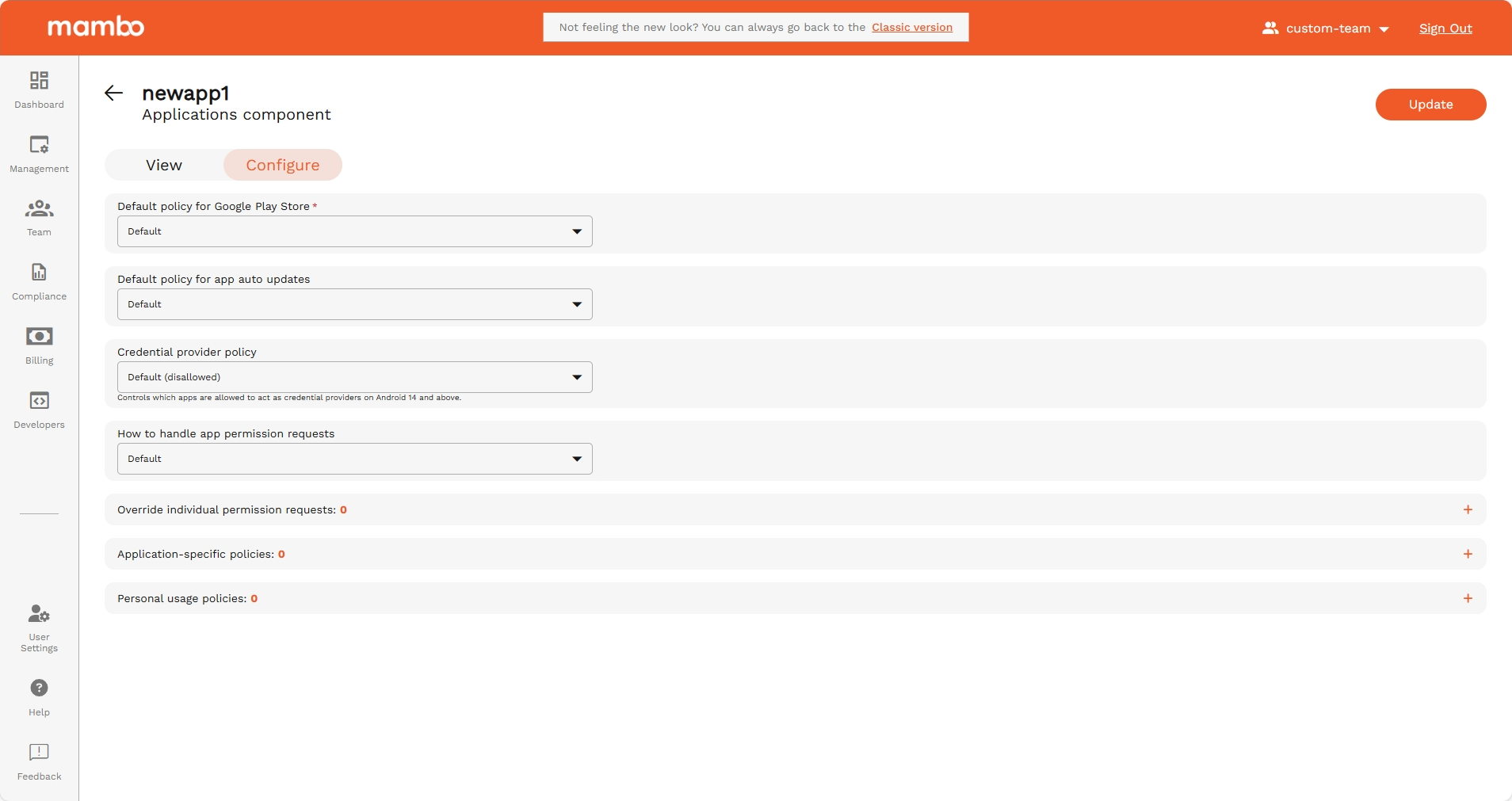
Default policy for Google Play Store
API reference: playStoreMode
Type: enum
This mode controls which apps are available to the user in the Play Store and the behavior on the device when apps are removed from the policy.
Possible values for Play Store mode policy.
Options
| Option | Enum | Description |
|---|---|---|
| Default | PLAY_STORE_MODE_UNSPECIFIED | Unspecified. Defaults to WHITELIST. |
| Only whitelisted apps | WHITELIST | Only apps that are in the policy are available and any app not in the policy will be automatically uninstalled from the device. |
| Block blacklisted apps | BLACKLIST | All apps are available and any app that should not be on the device should be explicitly marked as 'BLOCKED' in the applications policy. |
Default policy for app auto updates
API reference: appAutoUpdatePolicy
Type: enum
Recommended alternative: autoUpdateMode which is set per app, provides greater flexibility around update frequency.
When autoUpdateMode is set to AUTO_UPDATE_POSTPONED or AUTO_UPDATE_HIGH_PRIORITY, this field has no effect.
The app auto-update policy, which controls when automatic app updates can be applied.
Important: Changes to app update policies don't affect updates that are in progress. Any policy changes will apply to subsequent app updates.
Options
| Option | Enum | Description |
|---|---|---|
| Default | APP_AUTO_UPDATE_POLICY_UNSPECIFIED | The auto-update policy is not set. Equivalent to CHOICE_TO_THE_USER. |
| Always | ALWAYS | Apps are auto-updated at any time. Data charges may apply. |
| Choice to the user | CHOICE_TO_THE_USER | The user can control auto-updates. |
| Never | NEVER | Apps are never auto-updated. |
| WiFi Only | WIFI_ONLY | Apps are auto-updated over Wi-Fi only. |
Credential provider policy
API reference: credentialProviderPolicyDefault
Type: enum
Controls which apps are allowed to act as credential providers on Android 14 and above. These apps store credentials, see this and this for details. See also credentialProviderPolicy.
Options
| Option | Enum | Description |
|---|---|---|
| Default (disallowed) | CREDENTIAL_PROVIDER_POLICY_DEFAULT_UNSPECIFIED | Unspecified. Defaults to CREDENTIAL_PROVIDER_DEFAULT_DISALLOWED. |
| Disallowed when Credential Provider Policy of the app is unspecified | CREDENTIAL_PROVIDER_DEFAULT_DISALLOWED | Apps with credentialProviderPolicy unspecified are not allowed to act as a credential provider. |
| Disallowed except OEM default credential providers | CREDENTIAL_PROVIDER_DEFAULT_DISALLOWED_EXCEPT_SYSTEM | Apps with credentialProviderPolicy unspecified are not allowed to act as a credential provider except for the OEM default credential providers. OEM default credential providers are always allowed to act as credential providers. |
How to handle app permission requests
API reference: defaultPermissionPolicy
Type: enum
The default permission policy for runtime permission requests.
Options
| Option | Enum | Description |
|---|---|---|
| Default | PERMISSION_POLICY_UNSPECIFIED | Policy not specified. If no policy is specified for a permission at any level, then the PROMPT behavior is used by default. |
| Prompt device user | PROMPT | Prompt the user to grant a permission. |
| Always grant permissions | GRANT | Prompt the user to grant a permission. Automatically grant a permission. On Android 12 and above, READ_SMS and following sensor-related permissions can only be granted on fully managed devices: • ACCESS_FINE_LOCATION• ACCESS_BACKGROUND_LOCATION• ACCESS_COARSE_LOCATION• CAMERA• RECORD_AUDIO• ACTIVITY_RECOGNITION• BODY_SENSORS |
| Always deny permissions | DENY | Automatically deny a permission. |
Override individual permission requests
API reference: permissionGrants[]
Type: Array<Object>
Explicit permission or group grants or denials for all apps. These values override the defaultPermissionPolicy and permissionGrants which apply to all apps.
Override individual permission requests fields
| Field | API Reference | Type | Description |
|---|---|---|---|
| Permission | permission | string | The Android permission or group, e.g. android.permission.READ_CALENDAR or android.permission_group.CALENDAR. |
| Policy | policy | enum(Permission Policy) | The policy for granting the permission. |
Permission Policy
API reference: permissionGrants[].policy
Type: enum
The policy for granting the permission.
Options
| Option | Enum | Description |
|---|---|---|
| Default | PERMISSION_POLICY_UNSPECIFIED | Policy not specified. If no policy is specified for a permission at any level, then the PROMPT behavior is used by default. |
| Prompt device user | PROMPT | Prompt the user to grant a permission. |
| Always grant permissions | GRANT | Prompt the user to grant a permission. Automatically grant a permission. On Android 12 and above, READ_SMS and following sensor-related permissions can only be granted on fully managed devices: • ACCESS_FINE_LOCATION• ACCESS_BACKGROUND_LOCATION• ACCESS_COARSE_LOCATION• CAMERA• RECORD_AUDIO• ACTIVITY_RECOGNITION• BODY_SENSORS |
| Always deny permissions | DENY | Automatically deny a permission. |
Note: Duplicate permissions are automatically prevented.
Application-specific policies
Application Policy
API reference: applications[]
Type: object
Policy configuration for individual applications applied to the device.
The maximum number of applications allowed per policy is 3000.
Each entry represents configuration for a single application.
Applications can be added using:
- Play Store search
- Package name entry
- Private APK upload
- Device Insights quick add
Package Name
API reference: applications[].packageName
Type: string
The package name of the application.
Example: com.google.android.youtube
Capture App Insights
API reference: enableDeviceInsights
Type: boolean
It captures Memory Usage Stats, Battery Usage Stats, Storage Usage Stats and Network Data Usage Stats
Application enabled
API reference: applications[].disabled
Type: boolean
Whether the app is disabled. When disabled, the app data is still preserved.
Install Type
API reference: applications[].installType
Type: enum
The type of installation to perform.
The type of installation to perform for an app. If setupAction references an app, they must have installType set as REQUIRED_FOR_SETUP or the setup will fail.
Install Type Options
| Option | Enum | Description |
|---|---|---|
| Default | INSTALL_TYPE_UNSPECIFIED | Unspecified. Defaults to AVAILABLE. |
| Preinstalled | PREINSTALLED | The app is automatically installed and can be removed by the user. |
| Force Installed | FORCE_INSTALLED | The app is automatically installed regardless of a set maintenance window and can't be removed by the user. |
| Blocked | BLOCKED | The app is blocked and can't be installed. If the app was installed under a previous policy, it will be uninstalled. This also blocks its instant app functionality. |
| Available | AVAILABLE | The app is available to install. |
| Required For Setup | REQUIRED_FOR_SETUP | The app is automatically installed and can't be removed by the user and will prevent setup from completion until installation is complete. |
Install Type Notes
- Maximum 5 REQUIRED_FOR_SETUP apps allowed.
- CUSTOM apps:
- Must include signing certificates.
- Cannot use Play Store specific fields.
- Installed only through AMAPI SDK commands.
Roles
API reference: applications[].roles[]
Type: enum (RoleType)
Roles the app has.
Apps having certain roles can be exempted from power and background execution restrictions, suspension and hibernation on Android 14 and above. The user control can also be disallowed for apps with certain roles on Android 11 and above. Refer to the documentation of each RoleType for more details.
The app is notified about the roles that are set for it if the app has a notification receiver service with <meta-data android:name="com.google.android.managementapi.notification.NotificationReceiverService.SERVICE_APP_ROLES" android:value="" />. The app is notified whenever its roles are updated or after the app is installed when it has nonempty list of roles. The app can use this notification to bootstrap itself after the installation. See Integrate with the AMAPI SDK and Manage app roles guides for more details on the requirements for the service.
For the exemptions to be applied and the app to be notified about the roles, the signing key certificate fingerprint of the app on the device must match one of the signing key certificate fingerprints obtained from Play Store or one of the entries in ApplicationPolicy.signingKeyCerts. Otherwise, a NonComplianceDetail with APP_SIGNING_CERT_MISMATCH is reported.
There must not be duplicate roles with the same roleType. Multiple apps cannot hold a role with the same roleType. A role with type ROLE_TYPE_UNSPECIFIED is not allowed.
Role Type
| Field | API Reference | Description |
|---|---|---|
| Kiosk | KISOK | The role type for kiosk apps. An app can have this role only if it has installType set to REQUIRED_FOR_SETUP or CUSTOM. Before adding this role to an app with CUSTOM install type, the app must already be installed on the device. The app having this role type is set as the preferred home intent and allowlisted for lock task mode. When there is an app with this role type, status bar will be automatically disabled. This is preferable to setting installType to KIOSK. On Android 11 and above, the user control is disallowed but userControlSettings can be set to USER_CONTROL_ALLOWED to allow user control for the app with this role. |
| Mobile Threat Defense Endpoint Detection Response | MOBILE_THREAT_DEFENSE_ENDPOINT_DETECTION_RESPONSE | The role type for Mobile Threat Defense (MTD) / Endpoint Detection & Response (EDR) apps. On Android 14 and above, the app with this role is exempted from power and background execution restrictions, suspension and hibernation. On Android 11 and above, the user control is disallowed and userControlSettings cannot be set to USER_CONTROL_ALLOWED for the app with this role. |
| System Health Monitoring | SYSTEM_HEALTH_MONITORING | The role type for system health monitoring apps. On Android 14 and above, the app with this role is exempted from power and background execution restrictions, suspension and hibernation. On Android 11 and above, the user control is disallowed and userControlSettings cannot be set to USER_CONTROL_ALLOWED for the app with this role. |
Role Rules
- No duplicate roles allowed.
- Only one app per role type allowed.
- ROLE_TYPE_UNSPECIFIED is not allowed.
Role Enforcement Notes
If signing certificate mismatch:
NonComplianceDetailAPP_SIGNING_CERT_MISMATCHreported.
User Control
API reference: applications[].userControlSettings
Type: enum
Specifies whether user control is permitted for the app. User control includes user actions like force-stopping and clearing app data. Certain types of apps have special treatment, see USER_CONTROL_SETTINGS_UNSPECIFIED and USER_CONTROL_ALLOWED for more details.
Options
| Option | Enum | Description |
|---|---|---|
| Default | USER_CONTROL_SETTINGS_UNSPECIFIED | Uses the default behaviour of the app to determine if user control is allowed or disallowed. User control is allowed by default for most apps but disallowed for following types of apps: • extensionConfig(deprecated)• kiosk apps (see KIOSK install type for more details)• apps with roles set to a nonempty list• other critical system apps |
| Allowed | USER_CONTROL_ALLOWED | User control is allowed for the app. Kiosk apps can use this to allow user control. For extension apps, user control is disallowed even if this value is set. For apps with roles set to a nonempty list (except roles containing only KIOSK role), this value cannot be set.For kiosk apps (see KIOSK install type and KIOSK role type for more details), this value can be used to allow user control. |
| Disallowed | USER_CONTROL_DISALLOWED | User control is disallowed for the app. This is supported on Android 11 and above. A NonComplianceDetail with API_LEVEL is reported if the Android version is less than 11. |
Preferential Network ID
API reference: applications[].preferentialNetworkId
Type: enum
ID of the preferential network the application uses. There must be a configuration for the specified network ID in preferentialNetworkServiceConfigs. If set to PREFERENTIAL_NETWORK_ID_UNSPECIFIED, the application will use the default network ID specified in defaultPreferentialNetworkId. See the documentation of defaultPreferentialNetworkId for the list of apps excluded from this defaulting. This applies on both work profiles and fully managed devices on Android 13 and above.
Options
Install Priority
API reference: applications[].installPriority
Type: integer
Defines installation priority relative to other apps.
Amongst apps with installType set to:
• FORCE_INSTALLED
• PREINSTALLED
this defines a set of restrictions for the app installation. At least one of the fields must be set. When multiple fields are set, then all the constraints need to be satisfied for the app to be installed.
Install Constraint
API reference: applications[].installConstraint[]
Type: object
The constraints for installing the app. You can specify a maximum of one InstallConstraint. Multiple constraints are rejected.
Constraint Limit: Maximum one constraint allowed.
Install Constraint Fields
| Field | Description |
|---|---|
| networkTypeConstraint | Network type constraint. enum ( NetworkTypeConstraint) |
| chargingConstraint | Charging constraint. enum ( ChargingConstraint) |
| deviceIdleConstraint | Device idle constraint. enum ( DeviceIdleConstraint) |
NetworkTypeConstraint
API reference: applications[].installConstraint[].networkTypeConstraint
Type: enum
Options
| Option | Enum | Description |
|---|---|---|
| Default (Any active networks) | NETWORK_TYPE_CONSTRAINT_UNSPECIFIED | Unspecified. Default to INSTALL_ON_ANY_NETWORK. |
| Any active networks (Wi-Fi, cellular, etc.) | INSTALL_ON_ANY_NETWORK | Any active networks (Wi-Fi, cellular, etc.). |
| Any unmetered network (e.g. Wi-FI) | INSTALL_ONLY_ON_UNMETERED_NETWORK | Any unmetered network (e.g. Wi-FI). |
ChargingConstraint
API reference: applications[].installConstraint[].chargingconstraint
Type: enum
Options
| Option | Enum | Description |
|---|---|---|
| Default (Device doesn't have to be charging) | CHARGING_CONSTRAINT_UNSPECIFIED | Default to CHARGING_NOT_REQUIRED. |
| Device doesn't have to be charging | CHARGING_NOT_REQUIRED | Device doesn't have to be charging. |
| Device has to be charging | INSTALL_ONLY_WHEN_CHARGING | Device has to be charging. |
DeviceIdleConstraint
API reference: applications[].installConstraint[].deviceIdleConstraint
Type: enum
Options
| Option | Enum | Description |
|---|---|---|
| Default (doesn't have to be idle) | DEVICE_IDLE_CONSTRAINT_UNSPECIFIED | Default to DEVICE_IDLE_NOT_REQUIRED. |
| Device doesn't have to be idle, app can be installed while the user is interacting with the device | DEVICE_IDLE_NOT_REQUIRED | Device doesn't have to be idle, app can be installed while the user is interacting with the device. |
| Device has to be idle | INSTALL_ONLY_WHEN_CHARGING | Device has to be idle. |
Scopes
API reference: applications[].delegatedScopes[]
Type: enum
The scopes delegated to the app from Android Device Policy. These provide additional privileges for the applications they are applied to.
Delegation Scopes that another package can acquire from Android Device Policy.
Options
| Option | Enum | Description |
|---|---|---|
| Default | DELEGATED_SCOPE_UNSPECIFIED | No delegation scope specified. |
| Cert Install | CERT_INSTALL | Grants access to certificate installation and management. This scope can be delegated to multiple applications. |
| Managed Configurations | MANAGED_CONFIGURATIONS | Grants access to managed configurations management. This scope can be delegated to multiple applications. |
| Block Uninstall | BLOCK_UNINSTALL | Grants access to blocking uninstallation. This scope can be delegated to multiple applications. |
| Permission Grant | PERMISSION_GRANT | Grants access to permission policy and permission grant state. This scope can be delegated to multiple applications. |
| Package Access | PACKAGE_ACCESS | Grants access to package access state. This scope can be delegated to multiple applications. |
| Enable System App | ENABLE_SYSTEM_APP | Grants access for enabling system apps. This scope can be delegated to multiple applications. |
| Network Activity Logs | NETWORK_ACTIVITY_LOGS | Grants access to network activity logs. Allows the delegated application to call setNetworkLoggingEnabled, isNetworkLoggingEnabled and retrieveNetworkLogs methods. This scope can be delegated to at most one application. Supported for fully managed devices on Android 10 and above. Supported for a work profile on Android 12 and above. When delegation is supported and set, NETWORK_ACTIVITY_LOGS is ignored. |
| Security Logs | SECURITY_LOGS | Grants access to security logs. Allows the delegated application to call setSecurityLoggingEnabled, isSecurityLoggingEnabled, retrieveSecurityLogs and retrievePreRebootSecurityLogs methods. This scope can be delegated to at most one application. Supported for fully managed devices and company-owned devices with a work profile on Android 12 and above. When delegation is supported and set, SECURITY_LOGS is ignored. |
App Track IDs
API reference: applications[].accessibleTrackIds[]
Type: string
List of the app’s track IDs that a device belonging to the enterprise can access. If the list contains multiple track IDs, devices receive the latest version among all accessible tracks. If the list contains no track IDs, devices only have access to the app’s production track. More details about each track are available in AppTrackInfo.
AppTrackInfo
| Fields | Type | Description |
|---|---|---|
| trackId | string | The unmodifiable unique track identifier, taken from the releaseTrackId in the URL of the Play Console page that displays the app’s track information. |
| trackAlias | string | The track name associated with the trackId, set in the Play Console. The name is modifiable from Play Console. |
Connected Work And Personal App
API reference: applications[].connectedWorkAndPersonalApp
Type: enum
Controls whether the app can communicate with itself across a device’s work and personal profiles, subject to user consent.
Options
| Option | Enum | Description |
|---|---|---|
| Default | CONNECTED_WORK_AND_PERSONAL_APP_UNSPECIFIED | Defaults to CONNECTED_WORK_AND_PERSONAL_APP_DISALLOWED. |
| Allowed | CONNECTED_WORK_AND_PERSONAL_APP_ALLOWED | Allows the app to communicate across profiles after receiving user consent. |
| Disallowed | CONNECTED_WORK_AND_PERSONAL_APP_DISALLOWED | Default. Prevents the app from communicating cross-profile. |
Default Permission Policy
API reference: applications[].defaultPermissionPolicy
Type: enum
The default permission policy for runtime permission requests.
Options
| Option | Enum | Description |
|---|---|---|
| Default | PERMISSION_POLICY_UNSPECIFIED | Policy not specified. If no policy is specified for a permission at any level, then the PROMPT behavior is used by default. |
| Prompt device user | PROMPT | Prompt the user to grant a permission. |
| Always grant permissions | GRANT | Prompt the user to grant a permission. Automatically grant a permission. On Android 12 and above, READ_SMS and following sensor-related permissions can only be granted on fully managed devices: • ACCESS_FINE_LOCATION• ACCESS_BACKGROUND_LOCATION• ACCESS_COARSE_LOCATION• CAMERA• RECORD_AUDIO• ACTIVITY_RECOGNITION• BODY_SENSORS |
| Always deny permissions | DENY | Automatically deny a permission. |
Auto Update Mode
API reference: applications[].autoUpdateMode
Type: enum
Controls the auto-update mode for the app.
If a device user makes changes to the device settings manually, these choices are ignored by AutoUpdateMode as it takes precedence.
| Option | Enum | Description |
|---|---|---|
| Unspecified | AUTO_UPDATE_MODE_UNSPECIFIED | Unspecified. Defaults to AUTO_UPDATE_DEFAULT. |
| Default | AUTO_UPDATE_DEFAULT | The default update mode. The app is automatically updated with low priority to minimize the impact on the user. The app is updated when all of the following constraints are met: • The device is not actively used. • The device is connected to an unmetered network. • The device is charging. • The app to be updated is not running in the foreground. The device is notified about a new update within 24 hours after it is published by the developer, after which the app is updated the next time the constraints above are met. |
| Postponed | AUTO_UPDATE_POSTPONED | The app is not automatically updated for a maximum of 90 days after the app becomes out of date. 90 days after the app becomes out of date, the latest available version is installed automatically with low priority (see AUTO_UPDATE_DEFAULT). After the app is updated it is not automatically updated again until 90 days after it becomes out of date again.The user can still manually update the app from the Play Store at any time. |
| High Priority | AUTO_UPDATE_HIGH_PRIORITY | The app is updated as soon as possible. No constraints are applied. The device is notified as soon as possible about a new update after it becomes available. NOTE: Updates to apps with larger deployments across Android's ecosystem can take up to 24h. |
Minimum Version Code
API reference: applications[].minimumVersionCode
Type: string
The minimum version of the app that runs on the device. If set, the device attempts to update the app to at least this version code. If the app is not up-to-date, the device will contain a NonComplianceDetail with nonComplianceReason set to APP_NOT_UPDATED. The app must already be published to Google Play with a version code greater than or equal to this value. At most 20 apps may specify a minimum version code per policy.
Exempt from always-on VPN connection
API reference: applications[].alwaysOnVpnLockdownExemption
Type: enum
Specifies whether the app is allowed networking when the VPN is not connected and alwaysOnVpnPackage.lockdownEnabled is enabled. If set to VPN_LOCKDOWN_ENFORCED, the app is not allowed networking, and if set to VPN_LOCKDOWN_EXEMPTION, the app is allowed networking. Only supported on devices running Android 10 and above. If this is not supported by the device, the device will contain a NonComplianceDetail with nonComplianceReason set to API_LEVEL and a fieldPath. If this is not applicable to the app, the device will contain a NonComplianceDetail with nonComplianceReason set to UNSUPPORTED and a fieldPath. The fieldPath is set to applications[i].alwaysOnVpnLockdownExemption, where i is the index of the package in the applications policy.
Options
| Option | Enum | Description |
|---|---|---|
| Default | ALWAYS_ON_VPN_LOCKDOWN_EXEMPTION_UNSPECIFIED | Unspecified. Defaults to VPN_LOCKDOWN_ENFORCED. |
| Enforced | VPN_LOCKDOWN_ENFORCED | The app respects the always-on VPN lockdown setting. |
| Exemption | VPN_LOCKDOWN_EXEMPTION | The app is exempt from the always-on VPN lockdown setting. |
Home screen widgets permissions
API reference: applications[].workProfileWidgets
Type: enum
Specifies whether the app installed in the work profile is allowed to add widgets to the home screen.
Controls if a work profile application is allowed to add widgets to the home screen.
| Option | Enum | Description |
|---|---|---|
| Default | WORK_PROFILE_WIDGETS_UNSPECIFIED | Unspecified. Defaults to workProfileWidgetsDefault |
| Allowed | WORK_PROFILE_WIDGETS_ALLOWED | Work profile widgets are allowed. This means the application will be able to add widgets to the home screen. |
| Disallowed | WORK_PROFILE_WIDGETS_DISALLOWED | Work profile widgets are disallowed. This means the application will not be able to add widgets to the home screen. |
Credential Provider Policy
API reference: applications[].credentialProviderPolicy
Type: enum
Whether the app is allowed to act as a credential provider on Android 14 and above.
| Option | Enum | Description |
|---|---|---|
| Default | CREDENTIAL_PROVIDER_POLICY_UNSPECIFIED | Unspecified. The behaviour is governed by credentialProviderPolicyDefault. |
| Allowed | CREDENTIAL_PROVIDER_ALLOWED | App is allowed to act as a credential provider. |
Permission Grants
API reference: applications[].permissionGrants[]
Type: Array<Object>
Explicit permission or group grants or denials for all apps. These values override the defaultPermissionPolicy and permissionGrants which apply to all apps.
Permission Grants fields
| Field | API Reference | Type | Description |
|---|---|---|---|
| Permission | permission | string | The Android permission or group, e.g. android.permission.READ_CALENDAR or android.permission_group.CALENDAR. |
| Policy | policy | enum(Permission Policy) | The policy for granting the permission.. |
Permission Policy
API reference: applications[].permissionGrants[].policy
Type: enum
The policy for granting the permission.
Options
| Option | Enum | Description |
|---|---|---|
Default PERMISSION_POLICY_UNSPECIFIED | PERMISSION_POLICY_UNSPECIFIED | Policy not specified. If no policy is specified for a permission at any level, then the PROMPT behavior is used by default. |
Prompt device user PROMPT | PROMPT | Prompt the user to grant a permission. |
Always grant permissions GRANT | GRANT | Prompt the user to grant a permission. Automatically grant a permission. On Android 12 and above, READ_SMS and following sensor-related permissions can only be granted on fully managed devices: • ACCESS_FINE_LOCATION• ACCESS_BACKGROUND_LOCATION• ACCESS_COARSE_LOCATION• CAMERA• RECORD_AUDIO• ACTIVITY_RECOGNITION• BODY_SENSORS |
Always deny permissions DENY | DENY | Automatically deny a permission. |
Note: Duplicate permissions are automatically prevented.
Managed Configuration
Managed Configuration
API reference: managedConfiguration
Type: object (Struct format)
Managed configuration applied to the app. The format for the configuration is dictated by the ManagedProperty values supported by the app. Each field name in the managed configuration must match the key field of the ManagedProperty. The field value must be compatible with the type of the ManagedProperty:
| type | JSON value |
|---|---|
BOOL | true or false |
STRING | string |
INTEGER | number |
CHOICE | string |
MULTISELECT | array of strings |
HIDDEN | string |
BUNDLE_ARRAY | array of objects |
Note: string values cannot be longer than 65535 characters.
Api specific note
Struct
Struct represents a structured data value, consisting of fields which map to dynamically typed values. In some languages, Struct might be supported by a native representation. For example, in scripting languages like JS a struct is represented as an object. The details of that representation are described together with the proto support for the language.
The JSON representation for Struct is JSON object.
| Field name | Type | Description |
|---|---|---|
| fields | map<string, Value> | Map of dynamically typed values. |
ManagedProperty
Type: object
Managed property.
Fields
| Field | Type | Description |
|---|---|---|
key | string | The unique key that the app uses to identify the property, e.g. "com.google.android.gm.fieldname". |
type | enum (ManagedPropertyType) | The type of the property. |
title | string | The name of the property. Localized. |
description | string | A longer description of the property, providing more detail of what it affects. Localized. |
entries[] | object (ManagedPropertyEntry) | For CHOICE or MULTISELECT properties, the list of possible entries. |
defaultValue | value (Value format) | The default value of the property. BUNDLE_ARRAY properties don't have a default value. |
nestedProperties[] | object (ManagedProperty) | For BUNDLE_ARRAY properties, the list of nested properties. A BUNDLE_ARRAY property is at most two levels deep. |
ManagedPropertyType
The type of the managed property.
| Option | Enum | Description |
|---|---|---|
| Unspecified | MANAGED_PROPERTY_TYPE_UNSPECIFIED | Not used. |
| boolean | BOOL | A property of boolean type. |
| String | STRING | A property of string type. |
| Integer | INTEGER | A property of integer type. |
| Choice | CHOICE | A choice of one item from a set. |
| Multiselect | MULTISELECT | A choice of multiple items from a set. |
| Hidden | HIDDEN | A hidden restriction of string type (the default value can be used to pass along information that can't be modified, such as a version code). |
| Bundle | BUNDLE | A bundle of properties. |
| Bundle Array | BUNDLE_ARRAY | An array of property bundles. |
ManagedPropertyEntry
An entry of a managed property.
Fields
| Field | Type | Description |
|---|---|---|
value | string | The machine-readable value of the entry, which should be used in the configuration. Not localized. |
name | string | The human-readable name of the value. Localized. |
Managed Configuration Template
Managed Configuration Template
API reference: managedConfigurationTemplate
Type: object (ManagedConfigurationTemplate)
The managed configurations template for the app, saved from the managed configurations iframe. This field is ignored if managedConfiguration is set.
ManagedConfigurationTemplate
The managed configurations template for the app, saved from the managed configurations iframe.
Fields
| Field | Type | Description |
|---|---|---|
templateId | string | The ID of the managed configurations template. |
configurationVariables | map (key: string, value: string) | A map containing <key, value> configuration variables defined for the configuration.An object containing a list of "key": value pairs. Example: { "name": "wrench", "mass": "1.3kg", "count": "3" }. |
Custom App Config
API reference: applications[].customAppConfig
Type: enum (UserUninstallSettings)
Configuration for this custom app.
installType must be set to CUSTOM for this to be set.
UserUninstallSettings
Specifies if a user is allowed to uninstall the custom app.
| Option | Enum | Description |
|---|---|---|
| Default | USER_UNINSTALL_SETTINGS_UNSPECIFIED | Unspecified. Defaults to DISALLOW_UNINSTALL_BY_USER. |
| Disallow uninstall by user | DISALLOW_UNINSTALL_BY_USER | User is not allowed to uninstall the custom app. |
| Allow uninstall by user | ALLOW_UNINSTALL_BY_USER | User is allowed to uninstall the custom app. |
Signing Key Certificates
API reference: applications[].signingKeyCerts[]
Type: object (ApplicationSigningKeyCert)
Optional. Signing key certificates of the app.
This field is required in the following cases:
• The app has installType set to CUSTOM (i.e. a custom app).
• The app has roles set to a nonempty list and the app does not exist on the Play Store.
• The app has extensionConfig set (i.e. an extension app) but ExtensionConfig.signingKeyFingerprintsSha256 (deprecated) is not set and the app does not exist on the Play Store.
If this field is not set for a custom app, the policy is rejected. If it is not set when required for a non-custom app, a NonComplianceDetail with INVALID_VALUE is reported.
For other cases, this field is optional and the signing key certificates obtained from Play Store are used.
See following policy settings to see how this field is used:
• choosePrivateKeyRules
• ApplicationPolicy.InstallType.CUSTOM
• ApplicationPolicy.extensionConfig(Deprecated)
• ApplicationPolicy.roles
ApplicationSigningKeyCert
API reference: signingKeyCertFingerprintSha256
Type: string (bytes format)
Required. The SHA-256 hash value of the signing key certificate of the app. This must be a valid SHA-256 hash value, i.e. 32 bytes.
A base64-encoded string.
Control how apps in the personal profile are
Api Reference: personalPlayStoreMode
Type: enum
Used together with personalApplications to control how apps in the personal profile are allowed or blocked.
Personal Play Store Mode
Api Reference: personalPlayStoreMode
Type: enum
Options
| Option | Enum | Description |
|---|---|---|
| Default | PLAY_STORE_MODE_UNSPECIFIED | Unspecified. Defaults to BLOCKLIST. |
| Only whitelisted apps | ALLOWLIST | Only apps explicitly specified in personalApplications with installType set to AVAILABLE are allowed to be installed in the personal profile. |
| Block blacklisted apps | BLOCKLIST | All Play Store apps are available for installation in the personal profile, except those whose installType is BLOCKED in personalApplications. |
Applied to applications on the personal profile
API reference: personalApplications
Type: object
Policies for apps in the personal profile of a company-owned device with a work profile.
Applications can be added using:
- Play Store search
- Package name entry
personalApplications fields
| Field | Field Path | Type | Description |
|---|---|---|---|
| packageName | personalApplications.packageName | string | The package name of the application. |
| installType | personalApplications.installType | enum(installType) | Types of installation behaviors a personal profile application can have. |
Install Type
API reference: personalApplications.installType
Type: enum
| Option | Enum | Description |
|---|---|---|
| Default | INSTALL_TYPE_UNSPECIFIED | Unspecified. Defaults to AVAILABLE. |
| Blocked | BLOCKED | The app is blocked and can't be installed in the personal profile. If the app was previously installed in the device, it will be uninstalled. |
| Available | AVAILABLE | The app is available to install in the personal profile. |
Summary
Use the Applications Policy Component to:
✔ Control enterprise application distribution
✔ Configure managed application settings
✔ Deploy private enterprise applications
✔ Enforce permission and security policies
✔ Control personal profile applications
✔ Enable enterprise telemetry and analytics
✔ Enforce installation conditions and constraints
This component is the primary control point for enterprise application management across managed devices.